What Is a Matrix Question and How Do You Use One Effectively
Learn practical form optimization strategies in this AgentsForForms guide: What Is a Matrix Question and How Do You Use One Effectively.
At its heart, a matrix question is a way to ask multiple, related questions all at once, using the same set of answers. Think of it like a report card. Instead of getting a separate grade for every single assignment, you get one sheet that lists all your subjects and a consistent grading scale for each.
It’s a compact, efficient way to gather a lot of feedback without overwhelming the person answering.
What is a Matrix Question, Really?
Let's stick with an analogy. Imagine you just tried a flight of different coffees at a local café. Instead of the barista asking you about each one separately—"How was the aroma of the Ethiopian blend? How was the acidity? The body?"—they hand you a single tasting card.
On that card, the coffees are listed down the side, and across the top, you have a simple rating scale like “Poor” to “Excellent”. That single card is a matrix question. It takes several individual questions and neatly organizes them into a grid.
This isn't some new-fangled survey trick; it's a classic for a reason. In the world of surveys, a matrix question is simply a table that groups similar sub-questions into rows, all sharing the same answer options in the columns. It’s so common that major survey platforms report it’s one of their top five most-used question types, sometimes making up 25% of all questions in customer feedback forms. Its popularity is a testament to its efficiency, a topic you can explore further in guides on survey question usage and best practices.
The Anatomy of a Matrix Question
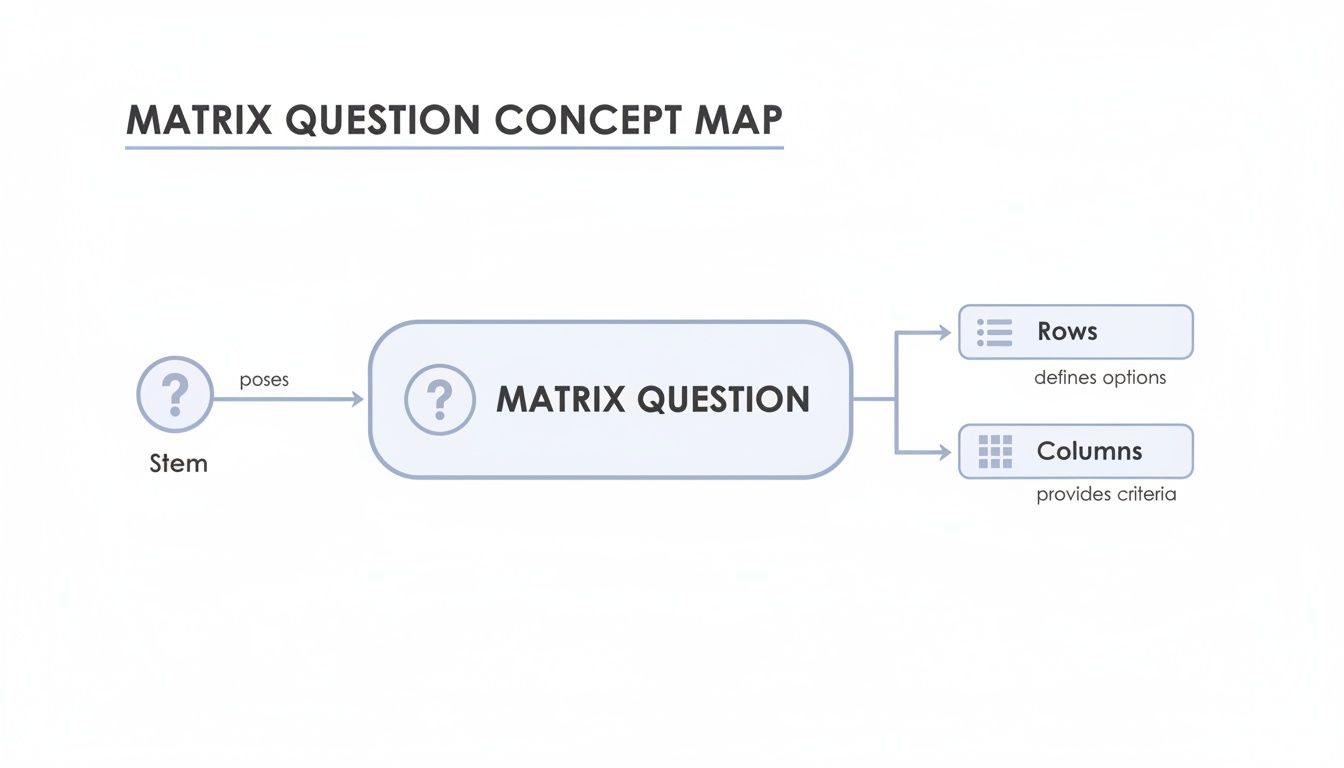
So, what makes a matrix question tick? To get a feel for how they’re built, it helps to break one down into its core parts. Think of it like a simple table with a few key ingredients.
We can organize these components to see how they fit together.
Anatomy of a Matrix Question
| Component | Description | Example |
|---|---|---|
| The Stem | The main question or instruction that frames the entire grid. It tells the respondent what to do. | "Please rate your satisfaction with the following aspects of our service:" |
| The Rows | The individual items, features, or concepts you want feedback on. Each row is its own mini-question. | Customer Support Product Quality Website Navigation |
| The Columns | The consistent set of answer choices used for every single row. This is usually a rating scale. | Very Dissatisfied Dissatisfied Neutral Satisfied Very Satisfied |
Each piece has a distinct job, but they all work together to gather structured feedback in a clean, organized way.
By combining a stem, rows, and columns, you can turn what might have been five, ten, or even more separate questions into one easy-to-scan grid. That consolidation is the real magic here—it saves space and reduces the mental effort needed from your respondents.
Exploring the Different Flavors of Matrix Questions
Matrix questions aren't a one-size-fits-all tool. Think of them less as a single question type and more as a flexible format with several variations, each built for a specific job. Getting to know these different flavors helps you move past basic satisfaction ratings to collect feedback that’s far more detailed and useful.
It's like having different lenses for your camera—each one captures a unique perspective.
The core structure is always the same, though. You have a main question (the stem), a list of items to evaluate (the rows), and a consistent scale to rate them on (the columns). This simple framework is the blueprint for all the types we're about to cover.
Classic Scales for Attitudes and Feelings
Let's start with the two most common formats you'll see in the wild: the Likert Scale and the Bipolar Scale. Both are fantastic for measuring attitudes, but they approach it from slightly different angles.
- Likert Scale: This is the one you probably already know. It measures agreement or satisfaction on a single-dimension scale, usually with 5 or 7 points (e.g., Strongly Disagree to Strongly Agree). A product manager might use this to quickly see how users feel about a new feature's ease of use, speed, and overall design.
- Bipolar Scale: Instead of moving from low to high on one metric, this scale uses two opposite adjectives as anchors at either end (like Difficult vs. Easy, or Cluttered vs. Organized). Respondents then place their feelings somewhere on the spectrum between those two poles. It’s perfect for capturing nuanced perceptions of brand personality or user experience.
These scale-based questions are the workhorses for collecting subjective feedback, but sometimes you need people to make harder choices.
Grids That Force Prioritization
When your goal is to understand what people truly value, asking them to rank or allocate resources is much more telling than just asking how they feel. These formats force respondents to make trade-offs, which reveals their real priorities.
A Ranking matrix does exactly what it says on the tin: it asks people to rank a list of items. An HR manager, for instance, could ask employees to rank workplace benefits like "Health Insurance," "Flexible Hours," and "Professional Development" in order of importance from 1 to 3.
This approach is so effective because it prevents everyone from just saying everything is "Very Important." By forcing a choice, you get a clear pecking order of what matters most.
The Constant Sum question takes this a step further. It gives respondents a fixed number of points or a percentage (that must add up to 100) to distribute across several items. This format has seen a 40% surge in marketing surveys because it reveals the precise weight of a person's preferences. One retail survey of 10,000 shoppers used it to figure out which marketing channels people valued most, which helped them reallocate their ad budget and boost conversions by 27%. You can read more about how constant sum questions work on Pollfish.
Ultimately, picking the right format comes down to what you need to know. Are you measuring sentiment, forcing a tough choice, or trying to understand how someone would divvy up a budget? Each type unlocks a different kind of insight. To see even more options, check out our guide to different question types in forms.
When to Use a Matrix Question and When to Avoid It
Knowing when to use a matrix question is a bit like knowing when to use a multi-tool versus a specialized wrench. The multi-tool is brilliant for handling a bunch of similar, straightforward tasks quickly, but it’s the wrong choice for a delicate or complex job that needs a specific approach.
This format truly shines when you have a set of related items that you need someone to evaluate using the exact same measurement scale.
Think about a classic customer satisfaction survey. Instead of asking three separate questions—"How satisfied were you with the agent's responsiveness?", "How satisfied were you with their knowledge?", and "How satisfied were you with their friendliness?"—you can bundle them into a single, compact grid. This saves your respondent a ton of clicking and mental energy, making the whole experience feel much smoother.
Ideal Scenarios for Using a Matrix Question
Matrix questions are at their best when efficiency and consistency are your top priorities. They are fantastic for gathering comparative data across a uniform set of items.
Go for a matrix question when you need to:
- Evaluate Sub-Components of a Single Topic: This is perfect for rating different features of a software product or various aspects of an event, like the quality of the speakers, the venue, and the catering.
- Measure Attitudes and Opinions Consistently: You can use it to effectively gauge how much people agree with a series of related statements, perhaps about your company culture or brand identity.
- Compare Competitors or Products: A matrix grid creates an easy-to-read, side-by-side comparison of your product against competitors on key attributes like price, quality, and customer service.
This structure is especially powerful in employee engagement surveys. For instance, using a matrix is a great way to have team members rank or rate potential workplace benefits. In fact, companies that use matrix grids in their employee polls see 32% higher participation rates than those relying only on single-choice formats, which can boost average completion from 62% to 87%. You can dig deeper into how matrix grids improve survey engagement on SmartSurvey.com.
Key Takeaway: A matrix question works best when your row items are clearly related and can be logically evaluated against the same, consistent set of column answers.
Red Flags When a Matrix Should Be Avoided
On the flip side, forcing this format where it doesn't belong can seriously compromise your data. The most common mistake is cramming unrelated items together. Imagine asking someone to rate "Customer Support," "Website Design," and "Product Shipping Speed" on a single scale of "Strongly Agree" to "Strongly Disagree." It's confusing, illogical, and forces a nonsensical answer.
You should definitely avoid a matrix when:
- The Items Are Unrelated: If the topics don’t share a common thread, they deserve their own separate questions. Don't force them together.
- You Need Detailed, Open-Ended Feedback: The grid format is inherently restrictive. It’s built for quantitative ratings, not for capturing nuanced, qualitative insights.
- The Questions Require Different Scales: If one item needs a frequency scale (like Never to Always) and another needs a satisfaction scale (like Very Dissatisfied to Very Satisfied), they simply can't live in the same matrix.
To make this crystal clear, here’s a quick cheat sheet for deciding whether a matrix is the right tool for the job.
Use vs Avoid Matrix Questions
| Ideal Scenarios (When to Use) | Problem Scenarios (When to Avoid) |
|---|---|
| Rating multiple features of a single product (e.g., app UI, speed, features). | Items require different rating scales (e.g., satisfaction vs. frequency). |
| Gauging agreement on a set of related policy statements. | You need detailed, nuanced, or "why" feedback for each item. |
| Assessing different aspects of a single service experience (e.g., cleanliness, staff, price). | The list of items is very long, risking survey fatigue. |
| Comparing your brand against competitors on the same attributes. | You're asking about sensitive or complex topics that need careful framing. |
| Employee feedback on consistent themes like management or work environment. | The survey will primarily be taken on small mobile screens. |
Ultimately, choosing the right question type comes down to respecting your respondent's time and ensuring your questions allow for clear, unambiguous answers. If a matrix grid feels forced, it probably is.
Navigating the Common Pitfalls of Matrix Questions
While matrix questions can be incredibly efficient, they’re also riddled with hidden dangers that can sabotage your results if you’re not careful. These aren't just small hiccups; they're fundamental problems that can introduce serious bias and frustration, poisoning the very data you’re trying to collect.
Knowing what to look for is the first step toward building surveys that people actually want to complete accurately.

Uncovering Hidden Respondent Biases
The neat, compact grid format looks great on paper, but in practice, it can encourage lazy, thoughtless answers from people who are either in a hurry or just not that into your survey. This behavior usually shows up in a couple of ways every researcher needs to recognize.
Two of the most destructive biases are:
- Straight-Lining: This is when someone picks the same answer for every single row without even reading the questions. They'll just click "Neutral" all the way down the page to get it over with. That mindless clicking makes their entire response worthless.
- Acquiescence Bias: This is our natural tendency to be agreeable. People are often more likely to select positive options like "Agree" or "Satisfied" for everything, especially if the scale is a bit confusing or the questions feel leading.
These patterns create a ton of noise in your data, making it hard to tell what’s real feedback and what’s just someone rushing through. If you’re not careful, you could end up making big decisions based on patterns that don’t even exist.
The Mobile Experience and Accessibility Nightmare
Beyond respondent bias, the single biggest challenge for matrix questions today is how terribly they work on small screens. With over 60% of online surveys now taken on mobile devices, this is a critical flaw you can't afford to ignore.
The wide, table-like layout forces people into a frustrating dance of horizontal scrolling just to see all the answer options for a single item. This awful user experience is one of the main reasons people abandon surveys. Nobody wants to pinch, zoom, and slide their way through a question.
A question format that is difficult to use is a format that will yield poor-quality data. If a respondent has to fight the interface, their focus shifts from providing thoughtful answers to simply finishing the task as quickly as possible.
This usability disaster extends to accessibility. For someone using a screen reader, navigating a complex table can be a complete nightmare. The software often struggles to announce the row and column headers correctly, making it nearly impossible for them to match a rating to the right item. This effectively locks out a whole segment of your audience and is a massive oversight in inclusive design.
Before you ever use a matrix question, you have to weigh its efficiency against these huge risks to your data quality, user experience, and accessibility.
Best Practices for Designing Effective Matrix Questions
Alright, so we've seen where matrix questions can go wrong. Now, let's talk about how to get them right. Following a few key principles can turn a potentially confusing grid into a fantastic tool for gathering clean, reliable data.
The whole game is about making things simple and focused for the person answering. A cluttered, overwhelming matrix is just asking for bad data, usually from people just clicking down the middle column to get it over with.

Keep Your Grid Concise and Clear
Simplicity is your best friend here. You want the respondent to glide through the question without having to stop and think too hard about how to answer.
- Limit Your Rows: Try to stick to 5-7 rows (the items you're asking about) at most. Any more than that, and you should probably split the question into two separate matrices, maybe grouping them by theme.
- Keep Columns Minimal: The same goes for your rating scale—aim for 5-7 columns. A 5-point scale is often a great choice because it gives people a true neutral option right in the middle.
- Write Unambiguous Labels: This one is huge. Every single row and column label needs to be crystal clear. If people have to guess what you mean, their answers won't be reliable.
These aren't just random numbers; they're your best defense against survey fatigue.
By keeping your grid tight and focused, you guide the respondent's attention and make it easier for them to provide thoughtful, accurate feedback for each item instead of resorting to shortcuts.
Prioritize a Mobile-First Mindset
Let's be real: most people are going to take your survey on their phone. A wide, sprawling matrix grid is a nightmare on a small screen.
The solution is actually pretty straightforward: break it up. Instead of forcing a grid that requires endless side-scrolling, your survey tool should automatically convert it into a series of simple, single-choice questions for mobile users. This "stacking" method shows one row at a time, creating a clean, tap-friendly experience that will do wonders for your completion rates.
For a deeper look into building better forms and surveys, check out these 10 survey design best practices for high-quality data. At the end of the day, a great user experience is directly tied to the quality of the data you get back.
How to Build an Intelligent Matrix Question
Alright, let's move from theory to action. Building a smart matrix question used to be a tedious manual process, but modern tools have changed the game completely. With an AI-powered form builder like AgentsForForms, you can generate an effective, user-friendly survey grid from a single, simple instruction.
This approach takes care of all the heavy lifting, freeing you up to concentrate on what really matters: asking the right questions. Let’s walk through how to create a dynamic matrix question that dodges the usual pitfalls and gives you clean, actionable data.
Step 1: Generate Your Question with AI
It all starts with telling the AI what you need. A quick, conversational prompt is all it takes to generate the entire structure, complete with clear row and column labels.
For instance, you could just type: "Create a matrix question to gauge customer satisfaction on a 5-point Likert scale from 'Very Dissatisfied' to 'Very Satisfied' for our new software. The items to rate are: 'Ease of Use,' 'Feature Set,' 'Performance Speed,' and 'Customer Support'."
Just like that, the AI builds a perfectly formatted question. This saves a ton of time and ensures your wording is clear and concise right out of the gate.
Here’s a look at how an AI form builder can take a simple prompt and instantly create a well-structured question.
The result is a polished, production-ready question that follows best practices—no manual setup required.
Step 2: Implement Conditional Logic and Validation
A truly intelligent matrix question doesn't just sit there and collect ratings; it interacts and adapts. By using conditional logic, you can create rules that trigger follow-up questions based on how someone answers.
- Trigger a Follow-Up: Let's say a user clicks "Very Dissatisfied" for 'Customer Support.' You can have a text box automatically pop up asking, "Could you tell us more about your experience?" This is the perfect way to capture rich, qualitative feedback at the exact moment it's most relevant. To see more examples, you can check out this practical guide to form builders with conditional logic.
- Set Validation Rules: To maintain data quality and avoid issues like straight-lining, you can make each row a required field. You could even implement more advanced validation to flag suspicious patterns, ensuring the data you collect is thoughtful and reliable.
The goal here is to gather structured data that can be fed into more advanced systems. Often, this information is organized and interpreted using AI powered knowledge management to make sense of complex feedback.
Step 3: Visualize and Analyze the Results
Once the responses start rolling in, it's time for the final step: analysis. Instead of getting bogged down in spreadsheets, modern analytics dashboards automatically turn your matrix data into easy-to-read charts and heatmaps.
This lets you see at a glance which areas are shining and which need a little more work. It makes spotting patterns and making data-driven decisions incredibly straightforward.
Frequently Asked Questions About Matrix Questions
Even when you know what a matrix question is, you'll still run into tricky situations when you actually sit down to build one. Let's tackle some of the most common questions that pop up.
How Many Rows and Columns Are Too Many?
This is a classic "it depends," but there's a solid rule of thumb: aim for no more than 7-10 rows (the items you're asking about) and 5-7 columns (the answer scale).
Once you get bigger than that, you run into a huge problem called "straight-lining." People get overwhelmed or bored and just start clicking the same answer all the way down the list to get it over with. Think Neutral, Neutral, Neutral, Neutral. Your data quality plummets.
This gets even worse on a phone. A massive grid on a small screen is a recipe for disaster, leading to endless scrolling and people just giving up. If you have a long list of items, do yourself (and your respondents) a favor and split it into two smaller, more manageable matrix questions.
Can I Use Different Scales for Different Rows?
Absolutely not. This is one of the hard-and-fast rules of survey design. The whole point of a matrix is to compare a list of items using the exact same scale. That consistency is what makes the format work.
If one question needs an agreement scale (Strongly Disagree to Strongly Agree) and another needs a frequency scale (Never to Always), they have to be two separate questions. Trying to cram them into one grid is a surefire way to confuse people and get back a bunch of meaningless data.
Are Matrix Questions Good for Mobile Surveys?
In a word: no. Traditional, wide-format matrix questions are notoriously bad on mobile. They almost never fit on the screen, forcing users to scroll horizontally, which is a major design sin and a top reason people abandon surveys.
If you know people will be taking your survey on their phones, you should avoid the classic grid layout entirely. A much better alternative is to present each row as its own individual question. Good survey tools can often do this for you automatically, adapting the format to fit the screen and giving everyone a much better experience.
Ready to build smarter, more effective forms without the hassle? AgentsForForms uses AI to turn your ideas into production-ready surveys and forms in seconds. Start building for free at agentsforforms.com.