A Practical Guide to form builder with conditional logic
Learn practical form optimization strategies in this AgentsForForms guide: A Practical Guide to form builder with conditional logic.
A form builder with conditional logic is a tool that lets you create smart, dynamic forms that change in real-time based on a user's answers. Instead of a one-size-fits-all list of questions, the form intelligently adapts, showing or hiding fields to create a personalized, conversational experience.
What Is Conditional Logic in a Form Builder?
Imagine a form that acts more like a conversation than an interrogation. That’s the core idea behind conditional logic. Instead of overwhelming every user with the same long, generic questionnaire, a smart form adapts on the fly. You can think of it as a "choose your own adventure" for data collection.
This isn't some complex wizardry; it all works on simple "if-then" rules that you define. For example: IF a user selects "Yes" to the question "Are you a current customer?", THEN the form can reveal a specific follow-up field asking for their account number. This simple mechanic is what transforms a rigid, static form into something that feels personal and efficient.
The Old Way vs The Smart Way
Let's be honest—nobody likes filling out long, irrelevant forms. Traditional static forms force everyone down the exact same path, whether the questions make sense for them or not. This is a classic recipe for user frustration, which often leads to them abandoning the form halfway through. A new user signing up for your webinar shouldn't have to scroll past a dozen questions meant for existing enterprise clients.
This is where a form builder with conditional logic completely changes the game. It creates intelligent pathways that guide each user through a unique journey tailored just for them.
Here’s a quick look at how the two approaches stack up.
Static Forms vs Forms With Conditional Logic
| Feature | Static Form (The Old Way) | Form With Conditional Logic (The Smart Way) |
|---|---|---|
| User Experience | Everyone sees all questions, leading to clutter and confusion. | Only relevant questions appear, creating a clean, personalized path. |
| Form Length | Feels long and intimidating, causing "form fatigue." | Appears shorter and more manageable, encouraging completion. |
| Completion Rate | Lower, due to high user friction and abandonment. | Higher, as the experience is smooth and respectful of the user's time. |
| Data Quality | Prone to irrelevant or incomplete answers from confused users. | Collects cleaner, more accurate, and context-rich data. |
| Personalization | One-size-fits-all; impossible to tailor the experience. | Dynamically adapts to each user for a conversational feel. |
Ultimately, conditional logic helps you gather better information while making the process painless—and even pleasant—for the user.
Most modern form builders provide a visual editor that makes setting up these rules surprisingly simple, often with a drag-and-drop interface.

This example from AgentsForForms shows just how intuitive building these rules can be. Here, the "Company Name" field is set to appear only if a user first identifies their role as "Professional."
The Growing Demand for Smart Forms
This move toward smarter data collection isn't just a niche trend; it's a massive shift in how businesses operate. The online form builder software market was valued at a whopping USD 4.06 billion in 2024 and is on track to hit USD 9.48 billion by 2032.
What’s driving this growth? It's the urgent need for more efficient data collection across the board—from lead generation and customer feedback to HR onboarding and event registrations. In all these areas, conditional logic is no longer a "nice-to-have" but a critical feature for success. You can find more insights about this growing market to see where things are headed.
Why Smart Forms Are a Business Game Changer
Getting the "what" of conditional logic is one thing, but the real magic happens when you understand the "why"—the actual impact these adaptive forms can have on your business. When you swap out those old, static, one-size-fits-all forms for something more intelligent, you're not just changing a webpage. You're fundamentally improving how you talk to your audience.
These smart forms aren't just a minor upgrade; they are serious conversion machines. Think about it: a potential lead lands on your form and only sees questions that make sense for them. The whole experience feels smooth and effortless. Every question you don't ask a user is one less reason for them to give up and leave.
By respecting a user's time and providing a personalized path, you're not just collecting data—you're building trust and making a strong first impression.
A form builder with conditional logic is your best weapon against "form fatigue." It guides people through a simpler journey, which means more of them will actually hit that final "submit" button.
Elevate Data Quality and Accuracy
Beyond just getting more people to finish your forms, the quality of the information you collect gets a massive boost. Smart forms act like an automatic filter, making sure the answers you get are relevant and make sense in context.
This means your team can finally stop wasting time trying to clean up messy spreadsheets or chasing down people for missing information.
For instance, a customer support team can get exactly what they need from the get-go. If a user selects "Bug Report" from a dropdown, the form can instantly ask for their browser version and a screenshot. That tiny, automatic step cuts out all the back-and-forth emails, letting your agents solve problems faster. This kind of precise data collection is a game-changer.
Enhance the User Experience
At the end of the day, a great user experience is what makes a business stand out. A form that feels like it's listening to you comes across as professional, modern, and just plain considerate. You’re no longer treating every visitor the same; you’re showing them you understand their specific needs.
This sharp focus on user-centric design is why the market for these tools is exploding. In fact, the global market for form builders is expected to hit USD 1,953.32 million by 2035. Why? Because businesses have seen that dynamic forms can improve the quality of responses by a stunning 25-40% compared to static ones. You can dig into the numbers in the full research about online form builder software.
Whether it’s a marketing team qualifying leads with laser precision or an HR department making onboarding a breeze, the possibilities are endless. The takeaway is simple: smart forms lead to better data, higher conversion rates, and much happier users.
Where Dynamic Forms Really Shine
Knowing the theory behind conditional logic is great, but seeing it work in the real world is where you'll have that "aha!" moment. A form builder with conditional logic isn't just a tool for asking questions; it's a way to solve tangible business problems across the board.
From marketing and sales to HR and customer support, these smart forms streamline how you operate. Instead of forcing everyone down the same path, you create tailored experiences that adapt to each person's needs. That’s what makes this feature so valuable.
Supercharge Your Marketing and Lead Generation
For any marketing team, the name of the game is capturing quality leads without frustrating potential customers. Conditional logic is your secret weapon here, letting you build intelligent, multi-step forms that qualify prospects as they type.
Picture someone landing on your "Request a Demo" page. The first question could be as simple as, "What is your company size?"
- If they choose "1-10 employees," the form can ask questions geared toward a startup, like what their biggest growth challenge is.
- If they select "500+ employees," the form instantly pivots to ask about their current tech stack and prepares to route them to an enterprise sales expert.
This way, you get the exact information you need without burying a small business owner in enterprise-level questions. It also segments your audience on the fly, saving your sales team a ton of time. For a deeper dive, check out our guide on creating high-converting multi-step form examples.
Streamline Customer Support and Triage
When a customer needs help, speed and accuracy are everything. A conditional form can serve as a smart triage system, making sure every issue gets to the right person or department from the get-go.
Think about a standard support ticket. The first question might be, "What is your issue related to?" The rest of the form changes based on their answer:
- "Billing Inquiry" immediately asks for an invoice number and sends the ticket straight to the finance team.
- "Technical Bug Report" opens up fields for their browser version, operating system, and a file upload for a screenshot.
- "Feature Request" guides them to a simple form that feeds directly into your product team's backlog.
This kind of automation gets the right details to the right people instantly. It cuts down on response times and gets rid of all that frustrating back-and-forth communication just to figure out the basic problem.
By asking targeted follow-up questions based on the user's initial problem, support teams can start working on a solution immediately instead of spending time gathering basic details.
It’s this kind of smart automation that explains why the form builder software market is expected to hit USD 4.2 billion by 2031. Teams in HR, event management, and operations are all using conditional logic to build efficient, no-code workflows. In fact, studies show this approach can increase form completion rates by an impressive 20-35%. You can explore more about these market trends and their impact.
Building Your First Smart Form with AgentsForForms
All this theory is great, but seeing a form builder with conditional logic in action is where the magic really happens. Let's walk through how you can build a dynamic, multi-step form with AgentsForForms—and do it all without writing a single line of code. The whole thing starts with a simple instruction, not a blank canvas.
Imagine you're setting up a registration form for a webinar. You need to know each attendee's job role to tailor the follow-up, showing different questions for marketers than for developers. Instead of messing with settings and fields, you just tell the AI what you want.
Prompt Example: "Create a webinar registration form that asks attendees about their job role. If they select 'Marketer,' ask about their biggest marketing challenge. If they select 'Developer,' ask about their preferred programming language."
In a matter of seconds, AgentsForForms spits out a complete, multi-step form with all the logic pre-configured. It understands the "if this, then that" relationship you described and builds the rules for you, which is a massive time-saver.
Fine-Tuning Your Logic in the Visual Editor
Once the AI gives you a starting point, you’re in the driver’s seat. The platform’s visual editor lets you see all the branching paths and tweak the rules until the user journey is just right.
This is where you can see how different answers send users down different paths.
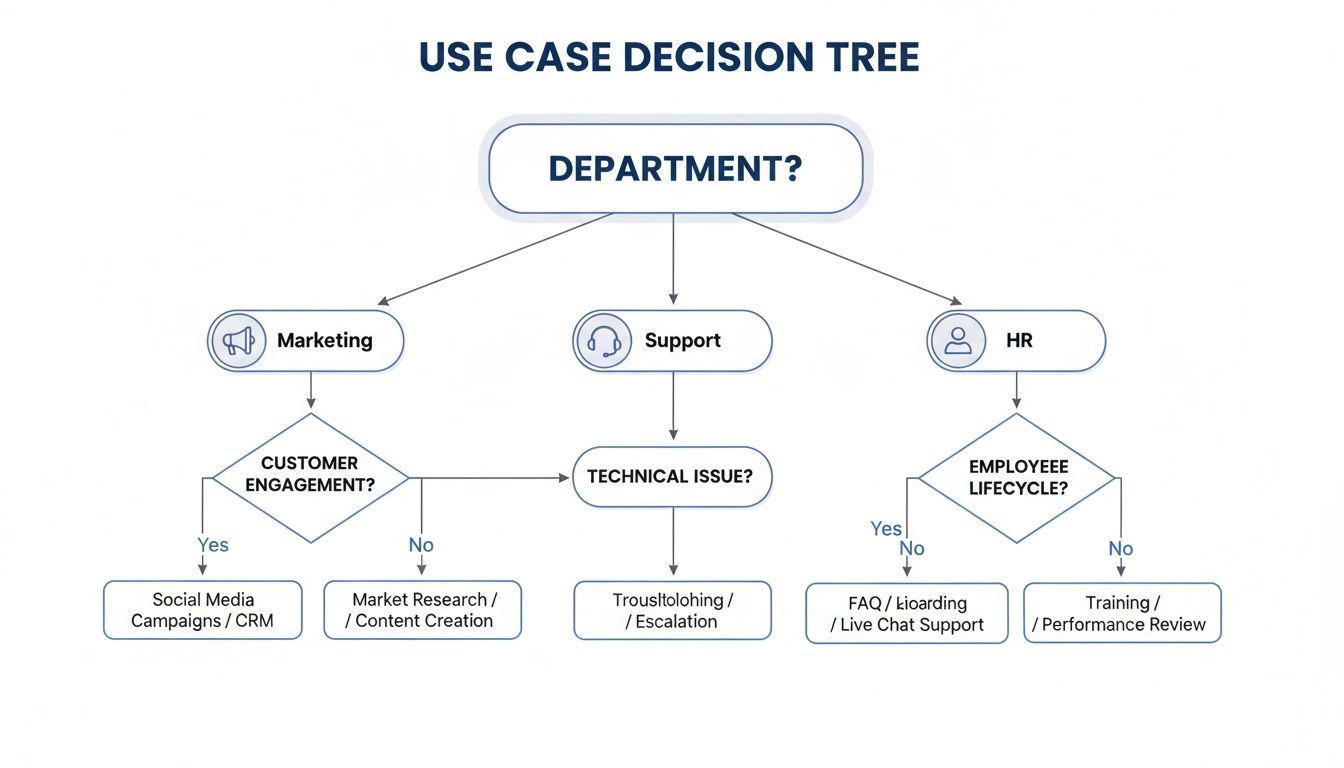
The decision tree above gives you a bird's-eye view of how logic can route someone from a general question about their department (Marketing, Support, or HR) into a workflow built specifically for them.
Maybe you decide to add another layer of logic. For instance, you could add a rule to show an optional "Company Website" field, but only if a user says their company has more than 50 employees. Making that kind of change is as easy as clicking the field and adjusting its visibility settings in a side panel.
Connecting Your Form to Your Workflow
A smart form truly shines when it’s hooked into the tools your team already relies on. Once your logic is locked in, the final piece of the puzzle is setting up the integrations. With just a few clicks, you can automate your next steps.
- Send a Slack notification to the sales channel the moment a new marketing lead comes through.
- Add a new row to a Google Sheet with registration details for your event coordinator to track.
- Kick off a workflow in Zapier to add new contacts directly into your CRM.
This kind of connectivity transforms a simple form from a data-gathering tool into an automated engine for your business. You started with a single, plain-English prompt and ended up with a high-converting, fully integrated smart form ready to go live on your site.
Best Practices for Designing Effective Form Logic
Building a form with conditional logic is one thing. Designing that logic so it’s actually effective, scalable, and doesn't make people want to tear their hair out? That's a whole different ballgame. Without a solid plan, your "smart" form can quickly become a tangled, confusing mess that frustrates users and gives you a data-quality nightmare.
The secret is to start simple. Before you even touch your form builder with conditional logic, grab a pen and paper. Seriously. Or open a simple flowchart tool if that's more your style. Sketch out the ideal user journey from start to finish. Just ask yourself: "If someone answers X, what's the most natural question to ask them next?" This simple act of mapping it out helps you catch dead ends and needlessly complicated paths before you waste time building them.
Think of this map as your blueprint. Once you have it, the actual building process in a tool like AgentsForForms becomes so much faster. More importantly, it ensures every rule you create has a clear purpose, guiding the user smoothly toward that final click.
Keep Your Logic Clean and Organized
As your form grows and you start adding more rules, the backend can get chaotic—fast. The goal is to build logic that's powerful but still easy for a human to manage and update down the road. A few good habits here will save you a world of pain later.
- Group Related Questions: Don't jump all over the place. Keep questions about the same topic together on one step. This makes the form feel more organized for the user and keeps your logic rules from becoming a spaghetti monster.
- Name Your Fields Clearly: Ditch generic labels like "Question 2." Instead, use descriptive names like "MarketingBudget_Monthly." When you're trying to figure out why a rule isn't firing, you'll thank yourself for making your logic so easy to read.
- Test Every Single Path: This one is non-negotiable. You have to click through every possible combination of answers yourself. It's the only way to be 100% sure that every user journey works as intended and nobody hits a wall.
Sticking to these principles doesn't just make the user experience better; it makes the form infinitely easier for you and your team to maintain. For a deeper dive into creating forms people actually enjoy filling out, check out our complete guide on mastering form design best practices for higher conversions.
Set Expectations and Prevent Dead Ends
Multi-step forms with branching logic are brilliant for making a long process feel less overwhelming. But people still need to know where they stand. Always, always include a progress bar. It shows them how far they’ve come and how much is left, a simple visual cue that’s been proven time and again to slash form abandonment rates.
Here’s the most critical rule of all: make sure there is always a default path. If a user’s answers don't happen to trigger any of your specific conditions, they still need to go somewhere. A logical next step, a generic thank-you page—anywhere but a dead end.
This "catch-all" condition is your safety net. It guarantees that every single user, no matter how unique their path, has a complete and satisfying experience. Building in this fallback prevents confusion and makes sure you capture every possible submission, making your smart form truly foolproof.
How to Choose the Right Form Builder for Your Team

Choosing the right form builder with conditional logic isn't just about ticking off features on a list. It’s about finding a tool that actually fits how your team works and can grow with you. There are tons of options out there, but a few key things really separate the good from the great.
First and foremost, look at the logic builder itself. Is it intuitive? A visual, drag-and-drop interface is pretty much essential these days. It means people who aren't developers can map out complex branching paths without having to write a single line of code.
This is a game-changer for marketing, HR, and support teams. It empowers them to build exactly what they need, when they need it, without getting stuck in a developer's backlog.
Evaluating Core Capabilities
Once you've confirmed the editor is user-friendly, dig a little deeper into its logic capabilities. Basic show/hide rules are table stakes, but your needs will get more sophisticated over time. Can the tool perform calculations on the fly? Can it use variables to personalize questions? Can it score leads based on their answers?
These are the features that let you build truly dynamic experiences, like an interactive quiz, a pricing calculator, or a lead qualification funnel that automatically sorts hot leads from cold ones.
A powerful form builder doesn't just collect data; it should act as an automated decision-making engine that works for you behind the scenes.
Of course, with great data comes great responsibility. The tool absolutely must have robust security and compliance features baked in. Look for the non-negotiables: SSL encryption, GDPR-friendly consent options, and solid spam protection. You need to be confident that the information you're collecting is safe and handled correctly.
Integrations and Collaboration
Let's be real: no form is an island. The right tool has to play nice with the other software you’re already using. This is where a deep library of integrations can make or break your decision.
- CRM and Marketing Automation: Can it pipe new leads directly into Salesforce or HubSpot?
- Team Communication: Does it have a native integration to send notifications to a Slack channel?
- Data and Analytics: Can it automatically populate a Google Sheet with every new submission?
- Workflow Automation: How well does it connect with services like Zapier or Make for building custom workflows?
Connecting your forms to your other tools is the key to real automation. You can get a sense of what’s possible by checking out a list of available form builder integrations and imagining how they could fit into your current processes.
Finally, think about teamwork. Modern tools are built for collaboration. Platforms like AgentsForForms excel here by offering shared workspaces, different user roles, and even comment-based feedback loops. This team-first approach, combined with AI that helps generate the forms for you, makes it a powerful choice for any team that's serious about working smarter.
Essential Feature Checklist for Form Builders
With so many options, a simple checklist can help you cut through the noise. Use this table to compare different form builders and make sure you're covering all the important bases for creating advanced forms.
| Feature Category | What to Look For | Why It Matters |
|---|---|---|
| Logic Builder | Visual, drag-and-drop interface; multi-step branching logic; support for "AND/OR" conditions. | Allows non-technical team members to build and manage complex workflows without needing developer assistance. |
| Advanced Functions | Calculations (e.g., pricing, scoring); variables for personalization; ability to pipe answers into later questions. | Enables interactive experiences like quizzes, cost estimators, and sophisticated lead qualification funnels. |
| Integrations | Native connections to your CRM, email marketing, and team chat tools; Zapier/Make compatibility. | Automates data transfer and follow-up actions, eliminating manual work and ensuring data ends up where it's needed. |
| Collaboration | Shared workspaces; user roles and permissions; version history; commenting or feedback features. | Facilitates teamwork, ensures brand consistency, and allows different departments to work on forms simultaneously. |
| Security/Compliance | SSL encryption; GDPR/CCPA tools; spam protection (like reCAPTCHA); secure data storage. | Protects user data, builds trust with your audience, and helps you meet legal requirements for data privacy. |
| AI Capabilities | AI-powered form generation from a prompt; AI-assisted logic suggestions; automated field creation. | Drastically speeds up the form creation process, reduces setup time, and helps build more effective logic flows. |
This checklist isn't exhaustive, but it covers the core functionality that separates a basic form tool from a true workflow automation platform. Focusing on these areas will help you find a builder that not only meets your needs today but can also scale with you tomorrow.
Frequently Asked Questions
Diving into smart forms can spark a few questions, especially when you're just getting started. Let's tackle some of the most common ones about using a form builder with conditional logic.
Can My Form Logic Be Too Complex?
Absolutely. It's easy to get carried away and build something so intricate that it backfires. While the ability to create complex, branching paths is a huge advantage, the goal is always clarity, not complexity.
The best practice? Map out the user's journey on paper or a whiteboard first. Make sure every rule you add has a clear, practical purpose. A great form should feel like a helpful guide, not a confusing maze.
How Does Conditional Logic Improve Lead Quality?
Think of conditional logic as a smart, real-time filter for your incoming leads. By asking targeted follow-up questions based on a user's initial answers, you can automatically qualify and segment them right inside the form.
For example, you could assign a "lead score" to certain responses. A user who identifies as a decision-maker at a company with over 500 employees is instantly flagged as a high-value lead and routed straight to your sales team. This intelligent filtering means your team gets cleaner, more relevant data from the get-go, cutting down on all that manual sorting.
This intelligent filtering means your team receives cleaner, more relevant data from the start, significantly reducing manual sorting and follow-up.
Is Setting Up Form Logic Difficult for Non-Coders?
It used to be, but not anymore. Modern no-code builders have completely changed the game, making it incredibly simple to set up sophisticated logic without touching a single line of code.
Platforms with AI features, like AgentsForForms, push this even further. You can generate an entire form and all its underlying logic just by describing what you need in a simple text prompt. This puts the power to build dynamic, intelligent forms in anyone's hands, regardless of their technical background.
What Metrics Prove My Smart Form Is Working?
To know if your form is really hitting the mark, you'll want to keep an eye on a few key performance indicators. These numbers will tell you whether your logic is creating a great experience or needs a little tweaking.
- Completion Rate: This is the big one. A high completion rate is the best sign that your form is intuitive and easy to use.
- Drop-Off Points: Analytics can pinpoint the exact questions where people are giving up. This is gold for figuring out what to fix.
- Time-to-Complete: Generally, the faster someone can complete the form, the better. A quick completion time usually means your logic is smooth and efficient.
Ready to build smarter forms that convert? AgentsForForms uses AI to turn your ideas into high-performing, multi-step forms in seconds. Get started for free on agentsforforms.com.