Build a Survey Form Template That Actually Converts
Learn practical form optimization strategies in this AgentsForForms guide: Build a Survey Form Template That Actually Converts.
A great survey form isn't just a list of questions; it's a carefully crafted tool built to do a specific job. The secret to building one that actually works? You don't start with the design. You start with a crystal-clear goal. That one foundational step dictates every question you ask, the words you choose, and even how the form feels to use. Get this right, and you'll collect clean, actionable data instead of a bunch of noise.
Defining Your Survey's Core Purpose

Before you even think about dragging and dropping a single field, hit pause. The most important thing you can do is define your mission. What, exactly, are you trying to accomplish? A vague goal like "get customer feedback" is a surefire way to end up with a cluttered, useless survey. You need to be precise.
Think about it this way: a product manager and a marketer could both use a survey, but their goals are completely different, which changes the entire DNA of the form.
- The Product Manager's Goal: "I need to understand why users are abandoning our new dashboard feature within the first week." This goal is laser-focused. It tells you who to talk to (new users who tried the feature) and what to ask about (their frustrations, what's confusing, and what’s missing).
- The Marketer's Goal: "I want to identify qualified leads for our enterprise plan by finding users with teams larger than 20 people." This goal is measurable. It nails down the audience and the specific data point needed to qualify them, which leads to a short, sharp lead gen form.
This early planning is what stops you from building a generic survey that doesn't really help anyone. Your objective is the North Star for every decision that comes next.
Pinpointing Your Target Audience
Once you have a sharp objective, your audience snaps into focus. Who are you actually talking to? The answer shapes everything from the language you use to how you send the survey out. A highly technical survey sent to a general audience will get you abysmal completion rates. On the flip side, an overly simple form sent to experts will only get you shallow answers.
Just think about how different the tone and complexity would be for these situations:
- Internal Employee Survey: You can get away with company jargon and assume people have some context. The tone can be more direct and collaborative.
- New Customer Onboarding Survey: Here, the language has to be simple and welcoming. You can't use industry slang. The goal is to make the user feel supported, not like they're being interrogated.
- Market Research Survey: This requires perfectly neutral, unbiased language to avoid steering the responses. Clarity is everything if you want the data to be reliable.
The biggest mistake I see is people trying to create a one-size-fits-all survey. It never works. A precision tool built for a specific job will always outperform a generic one. Define your mission, then build the tool to match.
Setting the Scope and Expectations
Having a clear purpose also keeps you from getting carried away. It’s so tempting to add "just one more question," but every single field you add creates friction and gives someone another reason to abandon your form.
Stick to questions that directly serve your main goal. If a question is just a "nice-to-know" but doesn't support your core objective, be ruthless and cut it.
Knowing the fundamentals behind how to create a questionnaire can seriously improve how effective your templates are. This clarity is also a huge help when you're writing your survey's introduction, which is critical for setting expectations and getting people to actually finish it. For more on that, check out our guide on https://agentsforforms.com/blog/how-to-write-an-introduction-to-a-survey-that-gets-results.
Crafting Questions That Get Real Answers
The data you get back is only ever as good as the questions you ask. It’s that simple. If your questions are vague, biased, or just plain confusing, you’ll end up with a pile of messy, unusable data. Crafting sharp questions is an art, but it’s one you can absolutely master by sticking to a few core principles.
Think of it like this: you wouldn't use a hammer to turn a screw. In the same way, you shouldn't use an open-ended question when a multiple-choice option would give you clean, quantifiable data. The format of your question directly shapes the kind of answer you’ll get.
Selecting the Right Question Type
A great survey form template is a thoughtful mix of different question types, each one there for a reason. Need to easily segment your audience by industry? Multiple-choice is your best friend. But if you’re trying to tap into genuine customer sentiment or uncover unexpected ideas, you need to give people room to elaborate.
Here’s a quick rundown of the most common types and when to pull them from your toolbox:
- Multiple-Choice: Perfect for when you have a defined set of answers. Use this for demographics, preferences, or any data you want to slice and dice in a chart. Think, "Which of these features do you use most often?"
- Likert Scale: This is the go-to for measuring sentiment or agreement. A simple question like, "How satisfied are you with our customer support?" on a 1-to-5 scale gives you a clear satisfaction score you can track over time.
- Open-Ended: Use these sparingly but strategically. They are absolute gold for uncovering the "why" behind a user's choice. A great follow-up to a low Likert scale score is, "We're sorry to hear that. What could we do to improve your experience?"
Never ask for information you should already have. Forcing a logged-in user to enter their email or asking about usage frequency when you have product analytics is a surefire way to frustrate them and tank your completion rates.
To help you decide, here’s a quick-reference table that breaks down which question type works best for different goals.
Choosing the Right Question Type for Your Goal
| Question Type | Best For | Example |
|---|---|---|
| Multiple-Choice | Categorizing respondents, gathering demographic data, or understanding preferences from a set list. | "What is your primary job role?" |
| Likert Scale | Gauging satisfaction, agreement, or importance on a spectrum. | "How important is 24/7 support to you? (1=Not important, 5=Very important)" |
| Open-Ended | Collecting qualitative feedback, personal stories, and understanding the "why" behind an answer. | "What's the one thing we could change that would make you happier?" |
| Rating (Stars/Smiley) | Getting a quick, visual read on sentiment or preference. | "Please rate your recent checkout experience." |
| Checkboxes | Allowing respondents to select multiple options from a list. | "Which of the following social media platforms do you use for work? (Select all that apply)" |
Choosing the right type sets the stage, but the real magic is in the wording.
The Art of Writing Clear, Unbiased Copy
Once you've picked a question type, the real challenge begins: the wording. Your goal is to write a question that every single person reads and understands in the exact same way, without any subconscious nudging from you. This is harder than it looks—our own biases have a sneaky way of creeping into our writing.
The most common trap is the leading question. This is a question that subtly pushes the respondent toward the answer you want to hear.
- Before (Leading): "Don't you agree that our new user interface is much easier to use?"
- After (Neutral): "How would you describe your experience with the new user interface?"
Another one to watch out for is the double-barreled question. This is when you accidentally cram two different ideas into a single query. It creates confusion because a user might feel differently about each part, which pollutes your data.
- Before (Double-Barreled): "How satisfied are you with the speed and reliability of our platform?"
After (Separated):
- "How satisfied are you with the speed of our platform?"
- "How satisfied are you with the reliability of our platform?"
Breaking these up ensures you get a clean signal on each attribute. For a deeper look at all the options, you can explore our complete guide to different question types in forms to really refine your strategy.
Before and After Examples in Practice
Let's see how small tweaks to wording can completely change the quality of the answers you get. Imagine you're building a survey form template for post-purchase feedback.
Scenario 1: Discovering Product Use Case
Weak Question: "Why did you buy our product?"
- This is way too broad. It invites generic answers like "to solve a problem," which tells you nothing.
Strong Question: "What specific task were you hoping to accomplish with our product?"
- This question forces the user to pinpoint the tangible outcome they were after, giving you powerful use cases for your marketing and product teams.
Scenario 2: Gauging Feature Interest
Weak Question: "Would you use a feature that let you export data to CSV?"
- This is a hypothetical yes/no. Most people will say "yes" to be nice, even if they don't really need it.
Strong Question: "How valuable would a CSV export feature be for your workflow? (1 = Not valuable, 5 = Extremely valuable)"
- Now you're measuring the degree of need. This helps you prioritize your roadmap based on what will actually make a significant impact on your users' day-to-day work.
At the end of the day, building a great survey is less like an interrogation and more like a well-structured conversation.
Designing a User-Friendly Survey Flow
If your survey is confusing or overwhelming, people will bail. It’s that simple. The flow and structure of your survey form template are every bit as important as the questions you ask. A well-thought-out user experience (UX) keeps people engaged and dramatically boosts the odds they’ll actually hit that final "submit" button.
The trick is to make the whole process feel effortless. Don't just throw a wall of 20 questions at someone. Instead, guide them on a logical, manageable journey. This small psychological shift—turning an interrogation into a conversation—is what separates a decent template from a truly effective one.
The Power of Multi-Step Forms
One of the best ways to improve your survey's flow is to break it into smaller, bite-sized pieces with a multi-step form. I’ve seen it time and time again: splitting a long form across multiple screens can significantly lift completion rates just by making the task seem less daunting.
Each step should feel like a small win. When someone only sees two or three related questions at a time, the cognitive load plummets. This approach works even better when you pair it with a visual progress bar.
A progress bar is a game-changer for two key reasons:
- It manages expectations. People can see exactly how far they've come and what’s left, which kills the anxiety that makes them want to quit.
- It creates momentum. Watching that bar fill up provides a sense of accomplishment, motivating them to push through to the end.
Think of it like climbing a staircase versus staring up at a skyscraper. The staircase gives you clear, achievable steps, while the skyscraper is just intimidating. Your survey should be a staircase.
This flowchart breaks down the core elements of writing good questions, which is a massive part of creating a user-friendly flow.
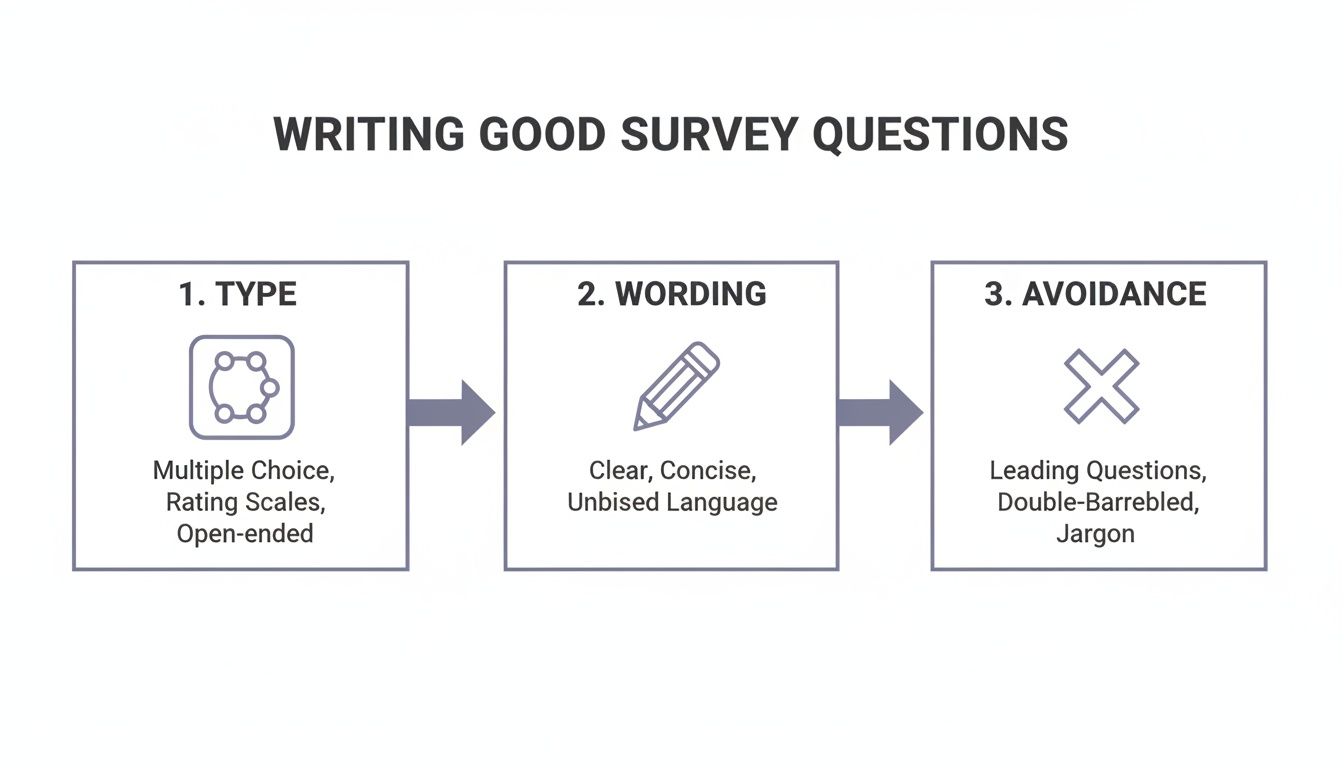
As you can see, choosing the right question type, wording it clearly, and steering clear of common pitfalls are all connected. Getting these right is fundamental to building a survey that people will actually finish.
Structuring Your Questions for Momentum
The order of your questions has a huge psychological impact on whether someone completes your survey. You want to build momentum right from the get-go.
Always start with your easiest, most straightforward questions. Think simple multiple-choice or rating scales that require almost no mental effort. Nailing these initial easy wins builds a user's confidence and gets them invested in the process.
Once you’ve got that momentum, you can introduce more complex or open-ended questions in the middle. Here's a pro tip: save any sensitive or demographic questions—like age, income, or contact info—for the very end. By the time someone gets there, they're already committed to finishing and are far more likely to share that information.
- Group related questions logically. Don't bounce from product feedback to marketing preferences and back again. Create thematic sections that feel like a natural conversation.
- Place open-ended fields strategically. Use them as follow-ups to specific multiple-choice answers. This gives you valuable context without making the survey feel like a chore.
The move to digital survey tools has completely changed how we collect market data, leaving behind the old paper-based methods that ate up so much time and money. You can learn more about the evolution of marketing survey checklists on SafetyCulture.com.
Creating a Personalized Path with Conditional Logic
Nothing kills engagement faster than forcing someone to answer irrelevant questions. This is where conditional logic (sometimes called branching logic) becomes your secret weapon for designing an exceptional survey flow.
Conditional logic creates a dynamic, personalized path for every single person. The questions they see depend entirely on their previous answers, which makes the whole experience feel smarter and more respectful of their time.
For instance, say you ask: "Have you used our new dashboard feature?"
- If they answer "Yes," you can branch them to a series of questions digging into their experience with that feature.
- If they answer "No," you can skip those questions entirely and send them right to the next relevant section.
This simple technique makes the survey shorter and more relevant for everyone. The result? Higher completion rates and, just as important, cleaner, more accurate data. You stop collecting useless "N/A" answers from people who were forced down the wrong path. Instead, every piece of data you get is from someone who was actually qualified to give it. This is how you turn a generic survey form template into a smart, responsive instrument.
Getting Practical: Survey Form Templates That Actually Work
Alright, let's move past the theory and get our hands dirty. Seeing how a well-built survey form template works in the real world is the best way to understand its power. A great template isn't just a list of questions; it's a finely-tuned machine built for a specific job.
We're going to break down a few classic examples you'll likely need. Each one has a completely different goal, which means the tone, question style, and overall flow need a unique approach. Think of this as your playbook for building forms that bring back clean, useful data.
The "In-the-Moment" Customer Satisfaction (CSAT) Survey
The whole point of a CSAT survey is to get a quick gut-check on how a customer feels right after something specific happens—like closing a support ticket or getting their delivery. The secret is making it so fast and easy that they barely have to think.
You're not trying to map their entire life story with your brand here. You just want a snapshot of that one interaction while it's still fresh.
A solid CSAT template always has these three things:
- A No-Brainer Rating: Kick it off with something visual and effortless. A 1-5 star rating or a simple smiley-face scale is perfect. "How did we do on your recent support request?" is all you need.
- A Smart, Optional Follow-Up: This is where conditional logic shines. If someone leaves a low score, say 1 or 2 stars, automatically show them a text box asking, "So sorry to hear that. What’s one thing we could have done better?"
- Zero Friction: If you already know their name, email, or order number, do not ask for it again. Every single field you can pre-fill or eliminate is one less reason for them to bail.
The best CSAT surveys feel less like a form and more like a quick text message. They should take under 30 seconds to fill out. That’s how you get feedback from everyone, not just the really happy or really angry customers.
The Lead Generation Survey: More Than Just a Contact Form
With a lead generation form, we're shifting gears from feedback to qualification. The challenge is to gather enough intel for your sales team without scaring away a potential customer by being too nosy.
You want it to feel like the start of a helpful conversation, not an interrogation.
Here's what a high-converting lead gen form looks like in action:
- A Multi-Step Flow: Don't throw all your questions at them at once. Break it up. Step one might just be their name and work email. Once they've made that small commitment, step two can ask about their company size and their role.
- Value-Driven Questions: Frame your questions around their world, not just your data fields. Instead of the blunt "What's your budget?", try a softer approach like, "What's the approximate annual budget you've set aside for solutions like this?"
- Clean Data by Design: Use dropdowns or multiple-choice options for things like industry or employee count. This keeps your data tidy and makes it a breeze for your CRM to automatically segment and score the new lead.
This step-by-step approach gets a psychological foot in the door, making people far more likely to see it through to the end.
The Employee Engagement Survey: Building a Foundation of Trust
When you’re asking employees for their honest opinions, trust is everything. The entire goal is to get candid, unfiltered feedback on the company culture, management, and what it’s really like to work there. That means anonymity and a respectful tone aren't just nice-to-haves; they're mandatory.
This type of survey is often longer, so you have to handle it with care. The design and language should scream, "We value your opinion, and this is a safe space." If you're looking for more inspiration, these 12 high-converting customer feedback form templates for 2026 offer some great ideas, as the core principles of building trust are universal.
A well-crafted employee engagement template must include:
- A Crystal-Clear Anonymity Pledge: The very first thing they see should be a statement explaining that their individual answers are confidential and will only be reported in aggregate.
- Scales for Measuring Sentiment: Use Likert scales (e.g., "Strongly Disagree" to "Strongly Agree") to consistently measure feelings about key areas like work-life balance, opportunities for growth, and team dynamics.
- Well-Placed Open-Ended Questions: Sprinkle in optional text boxes at the end of sections. After a series of questions on management, a simple, "Anything else you'd like to share about leadership in your department?" can uncover incredible insights.
When you make psychological safety the priority, you earn the right to hear the truth—the kind of feedback that actually helps you build a better workplace.
From Publishing to Actionable Insights

Hitting the "publish" button on your new survey feels great, but let's be honest—it’s not the finish line. It's the starting gun. A beautifully designed survey is completely useless if no one sees it or if the data it collects just sits there gathering digital dust.
Now, the real work begins. This is where we shift from design to distribution, analysis, and automation. Your goal is to turn those raw submissions into meaningful business decisions, translating abstract percentages into concrete actions that actually improve your product, marketing, or team.
Getting Your Survey in Front of the Right People
How you share your survey is just as important as the questions inside it. Blasting a generic link to a cold list is a surefire way to get low-quality, or worse, zero results.
Instead, think strategically about where your audience already is.
- Website Embedding: Put the survey right where the action happens. A customer satisfaction survey, for example, is most effective when it pops up right after a purchase is completed. The experience is still fresh in their mind.
- Direct Link Sharing: A clean, custom link is perfect for emails, social media posts, or even support chats. It offers a focused experience without any website distractions, which is ideal when you need someone's full attention for in-depth feedback.
- Email Campaigns: Don't just email your whole list. Segment it. Send a tailored survey to new sign-ups, another to your power users, and a different one to customers who haven't engaged in a while. Relevance is everything.
Turning Raw Data into Meaningful Analytics
Once responses start trickling in, it’s time to play detective and find the story hidden in the numbers. Simply glancing at the final results won't cut it. You need to dig into the behavior behind the submissions to find real opportunities.
Modern tools like AgentsForForms give you a live look with analytics dashboards that go way beyond simple pie charts. They help you pinpoint exactly where your form is working and, more importantly, where it's failing.
Look for the drop-off points. If 60% of users abandon your survey on question four, that question is your problem. It might be too confusing, too sensitive, or just poorly worded. This isn't a failure—it's your single most valuable piece of feedback.
Once your survey has run its course, a good platform will provide robust reporting tools to slice and dice the data. You can see how this works in this reporting demo. The ability to filter results, compare segments, and spot trends is what separates raw data from actionable intelligence.
Automating Workflows with Integrations
Here’s where you unlock the true power of a modern survey: connecting it to the other tools you use every day. Integrations transform your form from a simple data collection point into an active part of your business operations. Say goodbye to manual data entry.
Let's look at a few practical examples:
- Real-Time Notifications: Connect your form to Slack. Get an instant ping every time a hot lead comes in or a customer leaves a critical review. This allows your team to jump on it immediately.
- Automated Data Syncing: Link your survey to Google Sheets or your CRM. New submissions can automatically create a new row in a spreadsheet or a new contact record, keeping your data clean and organized without you lifting a finger.
- Triggering Next Steps: Use tools like Zapier or Make to build powerful automations. A new entry on an event registration form could add the person to your email list, send them a confirmation, and create a follow-up task for your sales team—all at once.
By setting up these connections, your survey becomes a dynamic trigger for action. It stops being a static endpoint and starts being the first domino in a chain of efficient, automated processes that push your business forward. This is how you turn simple feedback into a powerful operational engine.
Got Questions About Survey Templates? We've Got Answers.
Even with the best tools in hand, you're bound to run into a few questions when putting together a survey form template. It happens to everyone. Let's walk through some of the most common hurdles people face, so you can build your next survey with confidence and avoid the little mistakes that can mess with your data.
How Long Should My Survey Really Be?
This is the million-dollar question, and the answer is always: it depends. The perfect length is a constant tug-of-war between what you need to know and how much time your audience is willing to give you.
For quick hits like a post-purchase feedback form or a simple lead capture, shorter is always better. I usually aim for 5-10 tightly focused questions that someone can breeze through in less than three minutes. Get in, get the info, and get out.
If you're digging into something deeper, like an annual employee engagement study, you can get away with more. Maybe 15-20 questions is reasonable, but you have to set expectations from the start. A progress bar isn't just a nice-to-have in this scenario; it's essential for keeping people from bailing halfway through.
My rule of thumb is this: make your survey as long as it needs to be, but as short as humanly possible. Every single question you add is another reason for someone to give up. Be ruthless. If it's just a "nice-to-know," cut it.
What's the Secret to Getting More People to Respond?
Getting a high response rate isn't about one magic trick; it's a combination of smart psychology and even smarter design.
It all starts with a compelling intro. You need to quickly explain why you're asking for their time and—this is the important part—what’s in it for them. People are busy. Give them a reason to care.
Next, you absolutely have to nail the mobile experience. A huge chunk of your audience will be on their phones, and a clunky, hard-to-use form is a guaranteed way to lose them. Breaking your survey into a multi-step flow is a game-changer here. It feels less intimidating than a giant wall of questions and keeps the momentum going.
And finally, don't underestimate the power of a small, well-placed incentive. It doesn't have to be a new car. A simple discount code, a link to some exclusive content, or an entry into a giveaway can be the perfect nudge to thank them for their time and get them across the finish line.
How Do I Make Sure My Survey Answers Aren't Biased?
Biased data is bad data. If you can't trust your results, the whole exercise is a waste of time. Fortunately, there are a few things you can do to keep your answers clean and objective.
First, look at your wording. Are your questions truly neutral? Avoid leading language that nudges people toward a specific answer. Instead of, "Don't you agree our new feature is a huge improvement?" try something more objective like, "How would you rate your experience with our new feature?"
Here's another pro tip: randomize the order of your multiple-choice answers. It's a simple change, but it combats "order bias," which is the natural human tendency to just pick the first or last option they see.
Lastly, think about who you're asking. If you want to understand your entire customer base, don't just survey a small, hyper-specific group of power users. Your sample needs to actually represent the audience you're trying to learn from, or your conclusions will be completely skewed.
Ready to build smarter surveys that get real answers? With AgentsForForms, you can turn a simple prompt into a production-ready, multi-step survey in seconds. Our AI-powered platform helps you write clear questions, add smart logic, and analyze results to boost your completion rates. Start building your first survey for free at AgentsForForms.