How to Validate Email Addresses: how to validate email addresses in 3 steps
Learn practical form optimization strategies in this AgentsForForms guide: How to Validate Email Addresses: how to validate email addresses in 3 steps.
Validating an email address isn't a single action; it's a series of checks. You start with the basics, like a syntax check to catch obvious typos. Then, you move on to domain and MX record verification to make sure the email server actually exists. The final, crucial step is an SMTP check, which pings that server to see if the specific mailbox is active and ready to receive mail.
This whole process is about protecting your data quality from the very start, filtering out the bad, risky, or just plain fake emails the moment they're submitted.
Why Smart Email Validation Is No Longer Optional

If you think email validation is just about catching a typo here and there, you're leaving a lot of money on the table. An invalid email isn't just a missed opportunity; it’s an active liability for your entire marketing operation. Every single bounce chips away at your sender reputation, making it tougher for your real emails to land in the inbox.
This is exactly why modern validation has evolved so far beyond simple format checks. Today's standard is a multi-layered defense that guards your data integrity from the second a user clicks "submit." Building these advanced checks directly into your forms—especially with AI-powered tools like AgentsForForms—is essential for keeping your email list healthy and effective.
Let's break down exactly how to do this right.
The Real Cost of Bad Data
Letting bad email addresses slip through the cracks has real, tangible consequences that cascade through your entire marketing funnel. You're not just wasting a bit of database space; you're actively poisoning your own data well. Your campaign analytics become unreliable, your team wastes time chasing ghosts, and your performance metrics become a work of fiction.
The damage goes even deeper. High bounce rates are a massive red flag for email service providers like Google and Microsoft. The numbers are pretty stark.
According to Validity's 2023 Email Deliverability Benchmark, a staggering 1 in 6 legitimate marketing emails never even reaches the inbox. That's about 16.7%, often due to poor list hygiene.
Without proper validation, your bounce rate can easily soar past 6-10%. That's more than enough to get your domain flagged and your future campaigns routed directly to the spam folder. For a deeper dive, market analysis from Wise Guy Reports shows just how critical clean data has become for protecting revenue.
Quick Guide to Email Validation Layers
To get a clearer picture of the moving parts, here’s a quick breakdown of the core validation techniques. Each layer serves a specific purpose in building a high-quality email list.
| Validation Layer | What It Checks | Primary Benefit |
|---|---|---|
| Syntax Validation | Correct format ([email protected]), no illegal characters. | Catches simple typos and formatting errors instantly. |
| Domain/MX Check | Verifies the domain exists and has a mail server. | Filters out emails from non-existent or fake domains. |
| SMTP Handshake | Pings the server to confirm the specific user mailbox exists. | Confirms the address is active and can receive mail. |
| Disposable/Role Detection | Identifies temporary emails or role-based addresses (info@). | Reduces signups from low-engagement or shared inboxes. |
| Deliverability Score | Assesses the overall quality and risk of an address. | Provides a final, predictive measure of an email's value. |
Putting these layers together gives you a comprehensive system that doesn't just check for errors but actively vets the quality of every lead.
From Simple Fixes to Strategic Gains
Putting a solid validation strategy in place is more than just damage control; it's a powerful strategic move. When you guarantee the quality of every single email you collect, a lot of good things start to happen:
- Improved Deliverability: Fewer bounces build a stronger sender reputation. That means more of your emails land in the primary inbox where they belong.
- Accurate Analytics: Clean data gives you reliable metrics. You can finally trust your numbers and get a true picture of campaign performance.
- Higher Engagement: When you’re reaching real people who are genuinely interested, your open rates, click-throughs, and overall engagement will naturally climb.
- Enhanced ROI: Every marketing dollar works harder because it’s aimed at valid, reachable leads who actually want to hear from you.
At the end of the day, mastering how to validate email addresses is a cornerstone of modern marketing. It's a fundamental part of building a high-converting funnel. For more on this, check out our guide on 10 actionable conversion rate optimization tips for forms in 2026.
Building Your First Line of Defense Against Bad Data

To build an email list you can actually rely on, you have to stop bad data right at the source. The very first layers of defense are syntax validation and domain validation. Think of these as the absolute, non-negotiable bouncers for your online forms.
They're your first and best shot at catching obvious mistakes—the kind people make when they're typing too fast—without getting in the user's way. These initial checks act like an automated proofreader, instantly flagging common slip-ups and setting the stage for more sophisticated validation down the line.
Mastering Basic Syntax Validation
The most fundamental part of validating an email address is simply checking its structure, or syntax. This usually involves a pattern-matching script—often a regular expression (regex)—to make sure the text someone entered actually looks like a real email address.
It’s a simple check, but you'd be surprised how powerful it is for weeding out blatant structural flaws. A good syntax validator gives the user immediate feedback, telling them something's wrong before they even hit submit.
For instance, a syntax check will confirm basics like:
- Presence of an "@" symbol: It makes sure there's one—and only one—"@" separating the local part from the domain.
- A valid domain format: It looks for at least one period after the "@" symbol (think
company.com, notcompanycom). - No illegal characters: It'll instantly reject things that have no business being in an email, like spaces or a series of dots.
A layered approach is everything. I've seen basic syntax checks alone catch 20-30% of common typos. When you add domain and MX record checks on top of that, you can filter out another 40% of submissions that use completely fake domains. If you want to dive deeper into the numbers, Validity’s latest email deliverability research is a great read.
Confirming the Domain Exists
Okay, so an email looks right. But does its domain actually exist? That’s where Domain and MX Record Validation comes in. It's one thing for an address to be formatted correctly; it’s a whole different ballgame for it to belong to a real, functioning domain that can receive mail.
This check does two crucial things:
- It verifies that the domain (the part after the "@") is registered and active.
- It confirms the domain has a valid Mail Exchange (MX) record, which essentially tells the internet where to deliver its email.
If someone types in [email protected], this is the step that catches it. The check quickly flags that the domain either doesn't exist or isn't set up to handle email. This one check alone prevents a massive amount of junk from ever cluttering your database.
By combining syntax and domain validation, you're creating a really solid initial filter. It's a fast, efficient one-two punch that drastically cuts down on easily preventable errors. This ensures that only structurally correct emails from legitimate domains even make it to the next, more advanced stages of verification, protecting your sender reputation from day one.
Filtering Out Risky and Low-Value Emails
Once you've nailed the basics of syntax and domain checks, it's time to get a lot smarter about protecting your data quality. This is where we move beyond just "is it a real email?" and start asking, "is this a valuable email?"
Think of it as the difference between a bouncer checking IDs at the door and a host making sure the right people are on the guest list. We're actively filtering out emails that, while technically deliverable, are either high-risk or offer zero long-term value. This is how you stop data pollution at the source.
Dealing with Disposable Email Addresses
Ever see sign-ups from domains like 10minutemail.com? Those are disposable email addresses, and they're a huge headache. These are temporary inboxes designed to self-destruct after a few minutes, perfect for someone who wants to grab your free trial or download a lead magnet and then vanish.
For your business, these sign-ups are completely worthless. They artificially inflate your user numbers, skew your conversion metrics, and waste your marketing budget. Even worse, they're a massive red flag for people looking to abuse your service.
Blocking them is a must. A good validation service maintains a constantly updated blacklist of these disposable domains, stopping these junk sign-ups cold before they ever taint your list.
Identifying Role-Based Addresses
Another category to keep a close eye on are role-based addresses. These aren't tied to an individual person but to a department or function. You’ve seen them everywhere:
These emails are valid, sure, but they're notoriously bad for engagement. They’re often monitored by a whole team or just used for inbound queries, not for reading newsletters. Bombarding these inboxes with marketing emails is a fast track to high unsubscribe rates and spam complaints.
We’ve seen that advanced validation, like spotting disposable domains, can single-handedly block 15-25% of fraudulent sign-ups. When you add checks for catch-all servers and role-based traps, you can weed out another 15-20% of risky or low-value B2B contacts. If you want to dive deeper into the market for these tools, you can explore more trends in email validation.
Understanding Catch-All Servers
Finally, there’s the tricky business of catch-all servers. A company can configure its email server to accept any email sent to its domain, whether the mailbox (the part before the "@") exists or not.
So, if you send a message to [email protected], the server accepts it without a bounce. The problem is, you have no idea if a real person ever saw it. Your message might just disappear into a black hole. This uncertainty makes it nearly impossible to confirm if the address is legitimate, leading to silent delivery failures. Modern validation tools can often detect these servers, allowing you to flag these addresses as "unverifiable" and treat them with appropriate caution.
Putting Your Email Validation Strategy Into Action
Alright, theory is one thing, but how do you actually put all this into practice? The real trick is building a validation process that’s both smart and user-friendly. You need a system that can provide instant feedback for simple typos while running more serious, in-depth checks behind the scenes.
Ultimately, the goal isn't just to reject bad emails. It's to guide legitimate users toward a successful submission. A well-thought-out system stops garbage data from polluting your lists without frustrating genuine prospects and killing your form conversion rates.
Choosing Your Implementation Approach
When it comes to the "how," you’ve got three main ways to build your validation system. Each has its place, and the best setups usually mix and match.
Client-Side Validation: The First Line of Defense
This is the validation that happens right in the user’s browser as they type. It’s perfect for catching obvious mistakes instantly, like a missing "@" symbol or a ".cmo" instead of ".com."
The huge win here is the user experience. Nobody likes hitting "submit" only to be told they made a simple error. Instant feedback feels helpful, not punishing.
Server-Side Validation: The Non-Negotiable Gatekeeper
This is your mandatory security check. After the form is submitted, your server needs to run its own validation, regardless of what the browser-side checks did. Why? Because client-side validation can be easily bypassed by anyone with a little technical know-how.
Your server is where you can perform the deeper checks without slowing down the user's browser or exposing sensitive logic. Think of it as your final quality control checkpoint.
Third-Party APIs: The Heavy-Lifting Experts
For the most powerful and comprehensive validation, you bring in the specialists. Services like ZeroBounce or NeverBounce are built for this. They can perform MX record lookups, SMTP handshakes, and check against massive databases of disposable domains in a fraction of a second.
They do all the complex work and hand you back a simple, actionable result: valid, invalid, or risky. This is how you catch the really tricky stuff.
My Advice: The best strategy is almost always a hybrid one. Use client-side checks for a smooth UX, enforce server-side validation as your baseline security, and layer on a third-party API to catch everything else. This combination gives you great data quality and a great user experience.
The following chart shows how a layered filtering process works in practice, weeding out different types of problematic emails at each stage.
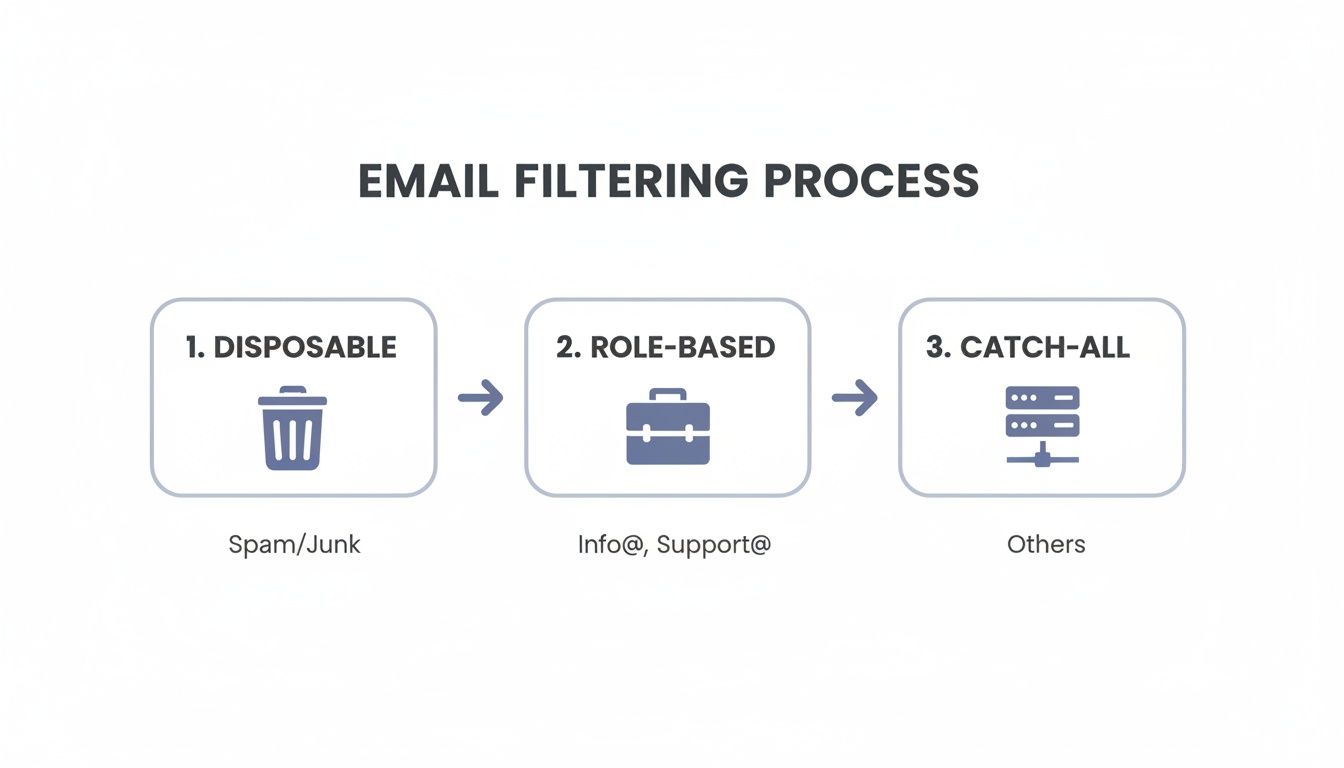
As you can see, it starts by knocking out the easy targets like disposable addresses before moving on to more nuanced checks for role-based accounts and tricky catch-all domains.
To help you decide which approach—or combination of approaches—is right for you, here’s a quick breakdown of the pros and cons of each method.
Comparing Email Validation Implementation Methods
| Method | Pros | Cons | Best For |
|---|---|---|---|
| Client-Side | - Instant user feedback- Improves UX- Reduces unnecessary server requests | - Easily bypassed- Can't perform deep checks (MX, SMTP) | Catching basic typos and syntax errors in real-time. |
| Server-Side | - Secure and reliable- Can't be bypassed by the user- Centralized logic | - Slower feedback loop for users- Requires a page reload or AJAX call | Essential security baseline for all forms; performing domain-level checks. |
| Third-Party API | - Most comprehensive and accurate- Detects disposables, catch-alls, etc.- Offloads complex tasks | - Adds cost (usually per validation)- Creates a dependency on an external service | High-stakes forms where data quality is critical (e.g., lead gen, user registration). |
Each method has a clear role to play. Client-side is for the user, server-side is for your security, and third-party APIs are for maximum data accuracy.
Smart Error Handling Makes All the Difference
How you tell a user they've made a mistake is just as important as finding the mistake in the first place. A generic "Invalid Email" message is frustrating and unhelpful.
Imagine someone types "[email protected]" by accident. A much better response would be, "Did you mean [email protected]?" This simple suggestion turns a moment of friction into a helpful interaction. It’s a small detail that can have a huge impact on whether someone completes your form or just gives up.
For more on this, check out our guide on how to create online forms that actually convert.
With a tool like AgentsForForms, you can build these intelligent validation rules right into your forms. You can set up workflows that combine different validation methods to create a powerful, multi-layered system that keeps your data clean without alienating your users.
Customizing Validation Rules for Different Goals
Not all forms are created equal, so a one-size-fits-all approach to email validation just doesn't cut it. The rules you apply should directly mirror what you’re trying to accomplish with that form. A simple newsletter signup has completely different data quality needs than, say, a user registration form for a financial app.
This is where you need to get strategic. It's a constant balancing act between gathering high-quality data and ensuring a smooth user experience. For some forms, you can afford to be a bit more lenient to get more signups. For others, iron-clad security is the only option.
Setting Rules for Marketing and Lead Generation
When you’re trying to capture leads—maybe for a newsletter or a whitepaper download—your main job is to reduce friction. You want to make it dead simple for someone to hand over their email address.
In this scenario, your validation strategy should be smart, but not overly aggressive.
- Block Disposable Emails: This is non-negotiable. An email from a temporary service is worthless for long-term marketing. Block them, always.
- Allow Role-Based Emails: Addresses like
[email protected]or[email protected]might not have the highest engagement rates, but they can still represent a solid business lead. It's usually better to let them through and segment them in your CRM later. - Flag Catch-Alls: Instead of blocking these outright, you can simply tag them as "risky" or "unverified" on the backend. This gives your sales team a heads-up without tossing out the lead entirely.
For most marketing forms, the goal is to weed out the obvious junk without scaring away a legitimate prospect who just happens to use a shared company inbox.
Your validation logic should directly support your business objective. For a lead magnet, you might accept a role-based address to capture a potential B2B lead. For a SaaS trial, you'd block it to ensure your product is evaluated by an individual user.
Implementing High-Security Validation
Now, let's flip the script. Think about a user registration form for your SaaS product or the checkout page on your e-commerce site. The stakes here are much, much higher. A bad email address could mean a user can't reset their password, misses critical account notifications, and ultimately creates a support nightmare for your team.
For these high-stakes forms, you need to tighten the screws.
- Block Disposable and Role-Based Emails: Both of these are red flags. They signal a high risk of account abandonment or, at best, very low-quality engagement.
- Reject Catch-All Domains: The uncertainty is just too big of a gamble. If you can't be sure the mailbox actually exists, it's not worth the risk for essential communications.
- Consider Flagging Free Email Providers: This is a good tactic for B2B platforms. You might not block a
gmail.comoryahoo.comaddress, but you could gently prompt the user to provide a corporate email instead.
This screenshot from a form builder like AgentsForForms shows just how easy it can be to create these separate rule sets.
A good tool lets you define and apply different validation logic depending on the form's context, making sure you get the right level of scrutiny every time. This approach massively boosts the data integrity of your most important systems.
You can even use conditional logic to build a smarter user experience. For instance, if an email gets flagged as a catch-all, the form could dynamically pop up a new field asking for an alternate contact method. This kind of layered approach is a cornerstone of building effective, high-converting multi-step forms. For more on that, you can find some great ideas in these 7 high-converting multi-step form examples.
Common Questions About Email Validation
As you start layering different validation checks, a few practical questions almost always come up. Let's walk through some of the most common ones I hear from teams building out their validation strategy.
What’s the Real Cost of Email Validation Services?
It really depends on your volume, but most third-party APIs offer pay-as-you-go or tiered subscriptions. For a small business just starting to validate a few hundred emails a month from their contact form, you might only spend 20 monthly. It's a pretty low bar to get started.
On the other hand, if you're handling thousands of new sign-ups every day, your costs could climb into the hundreds. The right way to think about this is as an investment. Paying a tiny fraction of a cent to confirm an email is real is a no-brainer when it prevents a high-value lead from bouncing or saves your sales team from chasing a ghost. The ROI is almost always there.
Is There a Difference Between "Validation" and "Verification"?
Good question. In conversation, people use them interchangeably all the time, but there's a technical difference worth knowing.
- Validation is usually about syntax. It's the first-pass check that asks, "Does this even look like an email address?" Think
[email protected]. - Verification goes much deeper. This is where you confirm the email address actually exists and can receive mail by checking MX records and performing an SMTP handshake.
Most modern services bundle both processes together, so you're really buying "verification" even if they call it "validation."
How Do Privacy Regulations Like GDPR Fit In?
This is a big one, and rightly so. The good news is that reputable validation services are built with privacy in mind. They do not send an actual email during the SMTP check. The process is just a server-level "handshake" to see if the mailbox exists, which doesn't involve processing personal data beyond the check itself.
To stay on the right side of regulations like GDPR, make sure your privacy policy is transparent. A simple clause stating you use third-party services to verify data accuracy for deliverability is usually all you need.
Can Validation Be Too Strict?
Absolutely, and this is a classic mistake. If you set the rules too aggressively, you'll frustrate real users and lose good leads.
I’ve seen B2B companies block all Gmail addresses, thinking it would filter out low-quality sign-ups. But in doing so, they blocked legitimate founders, consultants, and small business owners who use Gmail for everything. The key is to match your strictness to the goal. A newsletter sign-up can be pretty lenient, while a form for accessing a secure user portal should be much tighter.
Ready to stop bad data at the source? AgentsForForms uses AI to generate smart, multi-layered validation rules for your forms automatically, ensuring you collect high-quality data without sacrificing conversions. Build smarter forms in seconds at https://agentsforforms.com.